Home Vertical Solutions Archive by category Residential Security

Residential Security

VORTEX by VIVOTEK – PPE Detection on Cloud

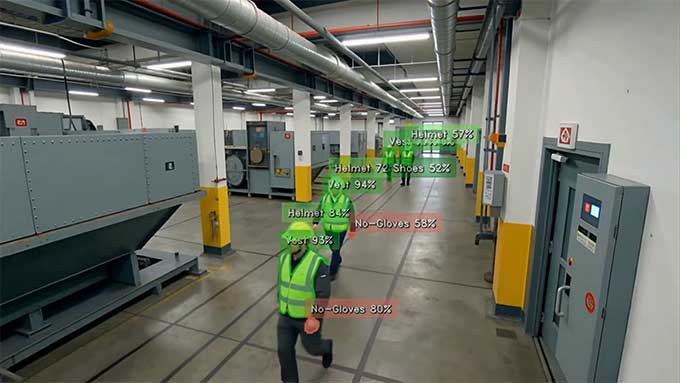
VORTEX, an AI-powered cloud surveillance platform by VIVOTEK, introduces its latest safety feature: PPE detection. PPE refers to Personal Protective Equipment, and the detection system is powered by Cloud AI and deep-learning algorithms running on VIVOTEK AI cameras. This feature automatically monitors whether workers are wearing the required safety gear in hazardous environments, helping organizations maintain real-time safety compliance.

How It Works

VORTEX uses cloud-based AI to accurately detect missing PPE, such as helmets and safety vests, and instantly triggers real-time alerts through the cloud. This enables quicker responses to prevent accidents before workers are exposed to danger. The AI model is trained to identify people and key PPE items, while the system checks whether the required equipment is worn in designated work zones. When a violation occurs – such as a worker entering a mandatory PPE zone without a helmet – the system immediately sends alerts via mobile push notifications, email, or integrated on-site speakers, allowing rapid intervention.

With the Case Vault in the VORTEX AI Hub, users can add selected clips and automatically generate a structured visual timeline with snapshots and video evidence. Reports can be exported as PDF files with a single click. All incidents are logged and stored with video evidence, creating audit-ready records for investigations and compliance reporting.

Key Benefits

Using the VORTEX cloud solution, safety managers can monitor multiple sites from a single platform and receive instant alerts whenever PPE violations occur, eliminating the need for manual supervision. The system provides continuous, automated oversight without labor-intensive spot checks, supports risk mitigation through immediate alerts, and improves operational efficiency by allowing safety personnel to focus on strategic tasks rather than constant monitoring. It also generates verified documentation needed for regulatory compliance, including OSHA requirements and insurance audits.

Where It’s Used

Typical deployment scenarios include construction sites, warehouses and logistics centers, mines and quarries, factories and manufacturing facilities, utilities and energy operations, as well as rail and transport projects. With VORTEX PPE Detection, safety enforcement becomes proactive, efficient, and verifiable – protecting workers while simplifying compliance in high-risk environments.

Salto announces the launch of XS4 Sense

Salto, today announced the launch of XS4 Sense, an innovative Smart Energy Management System (SMES) designed to revolutionize energy efficiency in buildings. Combining cutting-edge wireless technology with real-time energy monitoring platform, XS4 Sense empowers building operators to reduce energy consumption, lower carbon footprints, and achieve sustainability goals – all without complex installations or invasive infrastructure upgrades.

Building on Salto’s reputation for secure smart access solutions, XS4 Sense expands the smart access ecosystem technology portfolio by integrating real-time energy monitoring, advanced presence detection, and HVAC control into a compact, retrofit-friendly device. The wireless solution integrates seamlessly with Salto’s existing smart access ecosystem, including Salto Space and BLUEnet infrastructure, enabling rapid installation in operational hotels, workspaces, student dorms, cruise ships, and other properties.

Management made simple: Energy efficiency and control 

Built to work together, designed for retrofit, and certified for sustainability, the XS4 Sense enables building operators to reduce energy consumption, lower their CO₂ footprint, and meet sustainability goals – without the need for complex wiring or new infrastructure.

  • Energy savings: XS4 Sense provides energy savings at the individual room or space level, ensuring increased energy efficiency.
  • Wireless and retrofit-ready:Designed for seamless retrofit, XS4 Sense eliminates the need for complicated setups or extra tools through its advanced wireless architecture, making installation quick and disruption-free.
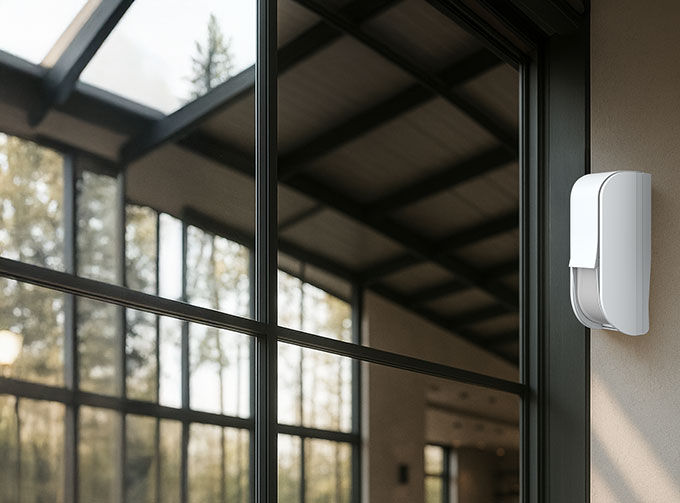
  • All-in-one smart controller: This wireless device integrates multiple functionalities into one compact module, including motion detection, door and window sensors, and HVAC control and is suitable for any room or space.
  • Flexible placement: Whether installed on ceilings, under eaves, or on door and window frames, the non-invasive wireless sensor design enables a quick retrofit in live environments which is ideal for hotels, student housing, workspaces, healthcare labs, cruise ship cabins, and other property types.
  • Seamless ecosystem integration: Works harmoniously with Salto’s smart access platform and is integrated to work with Salto Space, combining security, comfort, and energy efficiency into one smart access solution.

The Salto XS4 Sense offers a unique opportunity to complement existing access control solutions and deliver a measurable sustainability impact. The system is ideal for retrofitting projects in operational environments such as hotels, student dormitories, offices, cruise ship cabins, and vacation rental properties.

A powerful addition to Salto’s smart access ecosystem, the XS4 Sense delivers value for both existing customers and new developments seeking to align with sustainable building standards, ESG targets, and energy regulations. The system supports real-time monitoring and actionable insights, enabling operators to demonstrate measurable environmental impact and reduce long-term operational costs.

For more information about XS4 Sense and Salto’s smart building solutions, please visit: XS4 Sense.

ICT® and KONE Announce Integration of Protege GX with KONE Office Flow

Integrated Control Technology (ICT®), a leading provider of intelligent access control, intrusion detection, building automation, and security solutions, together with KONE, a pioneer in innovative people flow solutions, have announced the integration of ICT’s Protege GX system with KONE Office Flow. This powerful partnership delivers a unified elevator and access control platform designed to enhance operational efficiency, reduce administrative workload, and strengthen security in commercial buildings.

The synchronization of Protege GX with KONE Office Flow ensures user records are seamlessly integrated across both systems, creating a centralized and automated approach to building management. Access details such as elevator cars, floors, and control panels are populated within the Protege GX interface, enabling precise programming of access levels, schedules, expiration dates, and credentials. Key KONE features, including destination control and direct elevator call, are also supported, improving the flow of people in high-traffic environments.

The integration brings several significant benefits. Operations are streamlined by synchronizing user records and data between Protege GX and KONE Office Flow, eliminating the need to manage separate systems. Administrative workload is reduced, as redundancies are removed and staff can save valuable time while minimizing the risk of errors.

Security is enhanced with a single point of control for doors, turnstiles, and elevators, combined with synchronized access event tracking for comprehensive oversight.

End users also benefit from a simplified experience, with a seamless single-credential solution for both door and elevator access that delivers unmatched convenience. Advanced elevator management features add further value: destination control groups passengers traveling to the same floors into the same car, reducing lobby congestion, while direct elevator call automatically dispatches an elevator to a user’s assigned floor, saving time and simplifying movement through the building.

This integration addresses key challenges in modern commercial properties, including managing high traffic, ensuring robust security, and improving tenant satisfaction. The synchronized system reduces operational complexity for building managers while enabling smooth people flow during peak hours.

Sarah Thompson, Chief Product Officer at ICT, commented: “This collaboration with KONE is an exciting step forward in intelligent building management. By integrating Protege GX with KONE Office Flow, we’re delivering a solution that combines streamlined operations, heightened security, and a superior user experience. It’s the future of smarter, safer, and more connected buildings.”

Suprema: BioStar X – AI-Powered Next-Generation Integrated Security Platform

Maximizing Security and Operational Efficiency with the Convergence of AI-Based Access Control and Intelligent Video Analytics

The global security market is expanding at an unprecedented rate. According to Allied Market Research, the integrated security services sector is projected to grow at a compound annual growth rate of 13.7% from 2022 to 2031, reaching USD 55.5 billion by the end of the period. This growth is fueled by increasingly complex security challenges and a rising demand for unified solutions over standalone systems. Today, major corporations, government facilities, and international airports are moving swiftly toward integrated security platforms.

Integrated security is no longer just about safeguarding buildings—it’s becoming a cornerstone of operational excellence. While traditional systems focused primarily on access control and video surveillance, modern integrated platforms now unify a broad range of building functions—from HR management and fire detection to license plate recognition, HVAC, and lighting control—all within a single interface. This evolution reflects a clear industry need: security solutions that also optimize operational workflows.

Introducing BioStar X: AI-Powered Next-Generation Integrated Security Platform

To meet this need, Suprema has developed BioStar X, a cutting-edge integrated security platform that merges AI-powered access control with intelligent video analytics. Building on over 20 years of industry expertise, Suprema has created a solution that goes far beyond conventional access control—offering intelligent, scalable, and highly stable security operations for enterprise environments. BioStar X is advanced in both AI-driven access control and video analytics and provides exceptional scalability and reliability, even in large-scale deployments.

Convergence of AI-Based Access Control and Intelligent Video Analytics

BioStar X integrates AI-based access control and video analytics into a single platform. Real-time access management, video monitoring, and intelligent analytics can all be performed simultaneously on one screen, enabling efficient monitoring with minimal personnel. In the event of an incident, users can instantly identify the situation and its location, ensuring a rapid response.

The platform also features highly advanced AI-driven data analysis capabilities. It proactively detects and responds to threats through abnormal behavior analysis, including AI-based intrusion detection, loitering detection, and fall detection.

Moreover, it enables precise data analysis and enhanced security monitoring in large-scale facilities through features such as people counting, tailgating detection, blacklist detection, and missing person tracking. As such, BioStar X plays a vital role not only in multi-use facilities like schools, malls, airports, and hospitals but also in smart buildings.

For example, when deployed in schools, BioStar X can help prevent security incidents by detecting threats such as intrusions or weapon possession using AI video analytics. It can also identify abnormal behaviors like school violence or loitering and enable immediate intervention. Facial recognition technology can restrict outsider access and integrate with academic schedules to manage classroom entry and attendance. Additionally, it automates classroom locking and motion detection to secure unoccupied rooms. The system can also be integrated with pre-registration visitor management systems, enhancing campus-wide security through facial recognition or QR-based identity verification.

Maximizing Operational Efficiency and Security through a Unified Platform

By integrating multiple security systems—such as access control and video surveillance—into one platform, BioStar X allows security personnel to monitor and manage all security operations in real time through a single interface, eliminating the need to juggle separate systems. This streamlines security processes, enables rapid incident response, and improves both operational efficiency and overall security performance.

Improved efficiency also allows for optimized personnel allocation, while the reduced number of standalone systems lowers maintenance requirements and operational costs—ultimately driving down long-term expenses. Furthermore, BioStar X’s flexible scalability means additional security systems don’t need to be added separately. It can grow alongside organizational needs, enabling safer and more efficient environments.

Scalable and Stable for Enterprise Environments

For large-scale facilities, such as corporate buildings and government institutions, scalability and stability are essential. BioStar X supports the registration of tens of thousands of users and can reliably operate a vast number of devices—making it a true enterprise-grade solution. Suprema is already supporting major deployments like the Sejong Government Complex in Korea and the Mohammed VI University Hospital in Morocco.

The platform also offers the flexibility to meet complex enterprise requirements. With seamless integration capabilities for third-party systems and customizable UI/UX options, BioStar X can be tailored to meet even the most demanding environments. Security teams can personalize dashboards to display specific video feeds, data sets, or applications—delivering a user experience that is both powerful and intuitive.

BioStar X as an Essential Security Solution for the Future of Security

As security threats evolve, so too must the technologies that protect us. BioStar X represents the next generation of intelligent, integrated security—engineered for organizations that require more than just protection. Whether you manage a corporate office, a smart building, or a public institution, BioStar X delivers the perfect blend of advanced security and operational efficiency. It’s not just a platform—it’s a strategic investment in the safety, intelligence, and future-readiness of your organization.

AUREL MSR: Why Aren’t All Gas Sensors Mounted at the Same Height?


Different gas characteristics and complex interactions in the environment mean that not all gases are detected at the same height. The height and positioning of a gas sensor are therefore of crucial importance for detecting dangerous gases and vapours early on.

Why are gas sensors mounted at different heights?

Gas density

Not all gases are detected at the same height, as gases concentrate at different heights due to their density. A gas may be heavier or lighter than the air. Heavy gases tend to sink downward, while lighter gases rise upward. As a result, a heavy gas that remains near the floor will not be detected in higher areas and a light gas that rises upward will not be detected near the floor.

For example, carbon monoxide in the garage is measured at almost the same density as air and at breathing height. Carbon dioxide, on the other hand, has a relative density of 1.53 and is measured near the floor. Methane has a relative density of 0.56, moves quickly to the ceiling and is measured in that area.

Gas distribution

Gas distribution in the environment is also of crucial importance. The way in which a gas is distributed in a room depends on various factors, such as ventilation, temperature and the position of the source.

The concentration of gases is thus higher near the potential source than it is near the floor or ceiling. Positioning the gas sensor correctly ensures that a hazardous gas concentration will be detected immediately, before it spreads through the room.

Reaction times and sensitivity

Different reaction times and gas sensor sensitivity are also of crucial importance. A gas sensor located near the floor will react to gas that accumulates there faster than a gas sensor near the ceiling.

What else affects the gas sensor height?

Environmental conditions: Environmental conditions in the industry vary. By placing gas sensors at a variety of heights, differences in temperature, air current, or gas distribution, for example, are easier to detect.

Adapting to process requirements: Some processes require gas sensors to be placed in specific locations in order to monitor and control the relevant parameters. This is particularly true of complex production environments such as beverage manufacturing and automatic processing machines. The atmospheres in these areas are often made up of inert gas, which changes the specific density of gases relative to one another. One example of this is measuring oxygen in an argon atmosphere.

Safety standards: Placing gas sensors at different heights helps to ensure safety by monitoring potential hazards or gas leakages on different levels of a building or a plant and triggering an immediate alarm in the event of a hazard. These safety standards may be required by standards. So for example, a sensor height of 1.5-1.8 m is defined in garages for measuring carbon monoxide.

How are the gas sensors mounted?

The gas sensors are mounted in housing that protects them from outside influences. For comprehensive IP protection, the housing is installed with the gas sensor head pointing down. If the gas sensor is mounted at the wrong height, for example, the gas cannot be detected early. If the gas sensor is mounted mechanically incorrectly, the sensor’s IP protection is not guaranteed. It must also be clarified whether there is an air current and whether the gas sensor should be mounted on the ceiling or floor.

In garages, for example, there is a static current. A sensor here can detect the gases within a radius of 7-11 m, corresponding to approx. 400 m².

Which type of connection does MSR-Electronic offer?

MSR-Electronic uses a 3-conductor system for analogue gas sensor connections and a 4-conductor system for bus connections. The 3-conductor connector for the 4-20 mA connection is a stable connection type for an analogue connection. Each individual gas sensor is connected to the controller by means of complex wiring.

With the bus connection, on the other hand, only one cable is placed leading from the controller to the area being monitored. The individual bus users, such as “small light bulbs”, are mounted on a string of lights. The gas sensors are addressed here and communicate digitally with the controller.

Effective Strategies for Managing False Fire Alarms

False fire alarms can lead to substantial financial costs, operational disruptions, reputational harm, and even put lives at risk, Vladimir Zrnic, Regional Sales Manager for Europe at Advanced explains.

False alarms are a persistent issue that cost UK businesses over £1 billion annually. The implications aren’t just financial; repeated false alarms make people complacent, delay reactions in real fire emergencies, and put both lives and property at risk.

European fire services are already under increased pressure from issues such as wildfires, which have burned almost twice as much surface area in Spain, France, Italy, Croatia, and Greece compared to last year, and false alarms can divert them from these real emergencies.

False Alarm Strategies
Effective false alarm management begins with a thorough fire risk assessment and proper fire system design. Two primary approaches are detector technology, which screens false signals, and intelligent fire panels, which analyse sensor data to verify alarms. State-of-the-art systems integrate these methods to significantly reduce false alarms.

Intelligent fire panels

Combining data from detectors with an intelligent fire panel enhances false alarm management. Multi-sensor detectors can switch between heat and smoke modes, and double-knock programming ensures alarms are verified by multiple detectors. Advanced’s AlarmCalm system, featured in panels like MxPro 5, Axis EN, and Go, includes software detector technology that allows time to confirm the presence of fire before triggering a full fire alarm.

Intelligent fire panel applications

Apartments: False alarms often stem from everyday activities like cooking or shower steam. With AlarmCalm, if a verification sounder is activated by cooking smoke, a resident can press the AlarmCalm button to silence the sounder allowing residents to manage these alarms, reducing unnecessary evacuations.

Shopping Centres: In environments like supermarkets, where bakery ovens and other heat sources are common, if smoke from an oven activates a multi-sensor detector a verification countdown timer can begin. If the smoke clears and no heat is detected the system will return to normal, avoiding unnecessary shop evacuations.

Manufacturing: High temperatures, dust, and chemicals in manufacturing plants can trigger false alarms. Here, verification delays help ensure that alarms are genuine, if no further detectors are activated the system will reset, reducing disruption and maintaining productivity.

Offices: Varied occupancy offices can also benefit from flexible programming. With AlarmCalm, virtual building areas can be created independent of traditional fire zones, false alarm management can be tailored to specific needs to enhance safety and efficiency.

False alarms are more than just a nuisance—they compromise safety and incur substantial costs. Robust solutions like AlarmCalm combine advanced detection and intelligent fire panel technology to significantly reduce false alarms across diverse settings. By implementing such systems, businesses can protect their operations, reputation, and most importantly, their people.

For more information on Advanced’s AlarmCalm, visit: https://www.advancedco.com/solution/alarm-calm/

Senestar: Getting Ready for the EU Critical Entities Resilience Directive

The European Union’s Critical Entities Resilience Directive (CER) is a framework for strengthening the resilience of critical infrastructure against physical threats, be they natural or man-made, accidental or intentional. It covers a wide range of industries and sectors, including but not limited to energy, transportation, water treatment, and datacenters.

The CER requires that public and private organizations designed as critical infrastructure perform a security risk assessment and implement corrective actions. The directive also requires active cooperation and reporting within each sector’s applicable governing bodies. Adopted in 2023, regulatory enforcement is expected to begin by the end of 2026.

CER was introduced alongside NIS2, an updated cybersecurity framework. Like CER, NIS2 is concerned with the resiliency of designed critical entities, with both directives automatically applying. As both directives should be handled in parallel, a comprehensive risk assessment, one that takes both physical and cybersecurity considerations into account, is recommended.

Is Your Organization Ready?

There is a strong business case for meeting CER requirements – physical security is a substantial part of organization-level risk assessments and a key part of business continuity plans.

The CER process can be divided into four steps:

  1. Perform a physical security risk assessment.
  2. Create a resilience plan that describes the planned mitigation measures.
  3. Implement the plan.
  4. Monitor effectiveness and periodically reassess.

 A security fence along the perimeter of a facility is the first line of defense. But, by itself, it is only a minor deterrent to determined intruders – they can cut-through or climb it in seconds. Even without accessing any on-site buildings, intruders can threaten service, cause extensive damage, steal supplies, and/or injure themselves or others.

In addition to effective assessment and response tools, critical entities require scalable solutions that are suitable for deployment across large numbers of sites, are ultra-reliable, maintain a low nuisance alarm rate, and incorporate robust architectures that avoid downtime and unscheduled maintenance visits.

 Senstar offers a range of products that bring intelligence out to the perimeter. Intelligent lighting functions as an active deterrent while sensors and surveillance cameras detect and locate intrusion attempts. Perimeter detection enables a range of security responses, including triggering the site’s alarm system, queuing up camera systems, and engaging deterrence devices like audio messages or additional lighting. Interior areas can also be protected. As Senstar sensors share common communication protocols, a mix of sensors may be deployed at a site without adding additional infrastructure.

Securing Critical Infrastructure

With over 40 years of experience securing critical infrastructure worldwide, Senstar has the knowledge, European presence, and comprehensive portfolio needed to assist organizations in mitigating security vulnerabilities. Our perimeter intrusion detection, video management software, video analytics, and access control solutions are cost-effective, field-proven, and highly regarded throughout the critical infrastructure sectors.

Egal: How to achieve fast, high quality testing of copper and fibre cabling

The proliferation of the Internet and smart buildings, increased investment in the telecommunications sector and the growth of data centres around the world are driving the demand for structured cabling and, consequently, the need for efficient testing of network installations.

The structured cabling industry, from manufacturers to designers and installers, is facing accelerated growth driven by system convergence, edge computing and cyber security. The speed at which telcos, systems integrators and cabling companies are migrating to fibre, green cabling, power over Ethernet (PoE) and other highly sensitive copper cabling technologies is increasing the demands on the delivery of quality structured cabling installations. Finally, the manufacturers of passive and active network equipment are making the certification and warranty of systems dependent on the performance of appropriate tests, which are becoming more and more demanding in terms of human resources, know-how and time due to the increasing complexity of the network.

Taking structured cabling testing to the next level

Structured cabling professionals need solutions that are affordable while offering the widest range of capabilities for use with a variety of cabling technologies in passive networks and applications.

The AEM TestPro CV100 structured cabling test system is recognised by cable companies around the world as the answer to the trends and growing demands of cabling construction, from data centres to smart buildings.

Speed: Users say the solution is extremely efficient and much faster than competing devices, allowing installers to test multiple connections in a day’s work, saving companies time and money.

Ease of use: The AEM TestPro CV100 testers are simple and intuitive to use, allowing cable infrastructure to be tested quickly and successfully by staff of varying skill levels.

Price: Additional cost benefits are provided by a price that is significantly lower than the competition, especially as network installers can use the same equipment to test copper, fibre and wireless networks.

One instrument for all tasks, from testing to certification

The AEM TestPro CV100 allows installation teams to use a single instrument with the same user interface for all tests, changing only the interfaces for each cable type – a particular advantage in smart buildings where complex cabling infrastructures are involved, from fibre optic to CAT6A cabling for PoE, CCTV, automation, and other advanced applications.

For those responsible for deploying and ensuring the operation of access points, IoT systems, smart lighting and security systems, TestPro CV100 offers a comprehensive set of tests to ensure the infrastructure is ready to support these advanced technologies. For example, TestPro CV100 certifies CAT6A cables in seconds, including all standard test parameters and additional parameters such as DC resistance imbalance, TCL and ELTCTL transmission losses and distance to fault. In addition, TestPro CV100 provides Level 1 fibre certification and, in combination with OTDR, Level 2 fibre certification.

In addition to the most feature-rich modular platform, AEM’s system also incorporates LiveWiremap software, which provides instant audio and visual confirmation of connectivity between endpoints. Users confirm that testing is further simplified by the use of dual displays – at both ends of the link – and by the sheer speed and ease of test execution and generating reports.

Aurel: Hargassner Heating Technology Uses MSR Gas Sensors

Hargassner’s CHP (combined heat and power) wood gasification system is used to produce heat and power from biomass. Any leaks in the system process are hard to detect. MSR-Electronic gas sensors detect even the smallest gas leaks in the process, ensuring the utmost safety for the operator at all times.

By: Zlatko Dičak, CEO, Aurel; E-mail: zlatko.dicak@aurel.hr

Hargassner stands for eco-friendly heating with renewable energies such as biomass, pellets, wood chip boilers and wood logs. Especially in closed boiler rooms with infrequent traffic, the multitude of toxic gases and explosive areas creates a high risk of explosions and dangerous gas leakage.

Gas detectors from MSR-Electronic are used to continuously detect gas so that people and plants in the company’s boiler room have maximum protection.

How does gas detection work in boiler rooms powered by biomass?

 The gas sensors continuously monitor the ambient air and the CO concentration in the boiler room and are built into a switch cabinet. For maximum safety for people and plants, gas sensors are installed near the floor and ceiling. Gas sensors (type MC2) are used in the Hargassner boiler room to measure toxic gases in the ambient air and to monitor the oxygen concentration.

A module with μC, analogue output and power supply is integrated into the interchangeable sensor unit with digital measurement value processing, temperature compensation and self-monitoring in addition to the electrochemical sensor element with amplifier.

The µCcontroller uses the sensor’s measurement signal to calculate a linear 4-20 mA signal (or 2-10 V) and the relevant measuring values and sensor element data are also stored. In addition, the sensor unit can be calibrated by simply replacing it or by using the integrated, convenient calibration routine on the system itself.

Features

Features of MSR’s solution are: digital measurement value processing incl. temperature compensation, internal function monitoring with integrated Watchdog, high accuracy, selectivity and reliability, low zero drift, sensor with long lifetime, hardware and software according to SIL-compliant development process, reverse polarity protected, overload-proof and short-circuit proof, housing for holding the sensor unit, display with 2 open-collector outputs for horn and warning light, and duct mounting set.

The controller for GC-06 is built into the switch cabinet at Hargassner to monitor and evaluate the gas sensors. The gas controller is designed in accordance with EN 50545-1 and other standards, and can monitor and evaluate up to 100 gas sensors.

In addition, the freely adjustable parameters and setpoints enable flexible use in many areas of gas measurement technology. An easy to use system menu with a logical structure, right on the controller and requiring no special programming skills, is used to configure, operate and set the parameters. Alternatively, the PCE06 Software allows users to load, modify and save application parameters via a serial interface.

The GC-06 was configured and set according to the customer’s wishes. This meant that the systems could be installed by Hargassner via Plug&Play.

How Much Does a Security System Actually Cost?

When buying a security system, decisions often come down to the price tag of cameras, storage, and installation, yet taking this approach can leave the end user with major challenges ahead. Surveillance systems last anywhere from five to 20+ years, so condensing all cost considerations down to the initial expense fails to consider the bigger picture.

By: Ricardo Marranita, Product Growth Manager, Axis Communications; E-mail: ricardo.marranita@axis.com

The initial costs to purchase and set up a security system tend to account for just 30% of the total costs experienced during the lifetime of the system – also known as the total cost of ownership. Despite this, many end users may even make their decision based on the price of cameras alone. In effect, they are making their choice with just a 10-15% view of the total security system costs. The reality is that roughly 70% of expenses come after the system has been installed. Sadly, these can come as a nasty surprise for those end users who have not considered the indirect security system costs.

Taking some time to think about how the system will be used and the costs associated with that use can create significant savings in the long run. Initial choices – such as the type of device to deploy –impact future expenses, from power consumption to monitoring and maintenance. While we’ll focus on cameras specifically here, this principle applies to any device within a surveillance system. Considering the total cost of ownership will help you to identify the questions to ask as you make your decision on which new security system to purchase.

Look Beyond the Cameras’ Price Tag

Filtering is an important step in the purchase process: setting out your surveillance requirements and the available budget is key to narrowing down your choices. Unfortunately, too many initial conversations around requirements focus on the cameras alone, without considering the broader requirements of the system as a whole – from energy use to storage needs.

It might be tempting to focus the budget conversation on cameras, rather than where money will need to be spent to operate and maintain those cameras. Yet the security system will need to support your needs for the foreseeable future. It’s worth remembering that the costs to operate, monitor and maintain certain cameras often exceed the devices themselves and must therefore be weighed up before the purchase is made.

Forecasting Storage Costs

If you’re in the market for a new surveillance system, it’s very likely that you’ll need to consider how to store footage once recorded. On average, legislation requires potential evidence to be stored for a month. Yet in some regions or use cases, this is extended to 180 days – making storage a considerable factor in overall security system costs.

To avoid being caught out with significant server and electricity expenses after cameras are installed, it’s critical to consider the different storage costs associated with each camera model you’re considering. It can be a false economy to purchase cheaper cameras to cut down the initial outlay if they come with vast storage requirements, forcing you to spend more on servers and energy costs in the long run.

Equally, if you plan to reduce storage costs by shrinking the size of the video stored, you will need to carefully choose the right devices to ensure that compressing the video doesn’t compromise evidence quality by pixelating or blurring images to the point that it’s no longer possible to identify a suspect. Ending up with poor-quality footage that cannot act as useful evidence can defeat your objective of installing the security system in the first place. Some cameras come with sophisticated technology that can reserve all the important forensic detail you need while lowering bandwidth and storage requirements, and therefore long-term costs. It’s worth checking any claims of high-quality footage with low storage requirements before you install the system to ensure it meets your expectations.

Each set of requirements is unique. For example, you may require high-quality images even in the dark. While some cameras might compensate for low light levels by increasing the gain and therefore, storage requirements and costs, other options use alternative light-optimizing technologies that do not have the same large-scale impact on storage costs. They might even help you to save your budget by removing the need for additional external lighting.

Anticipating All Indirect Costs

The type of device you choose will influence costs far beyond storage. To forecast the full security system cost, monitoring, maintenance, and electricity use must also be considered.

Once you crunch the numbers, the costs can start to build up quite quickly but crucially, the devices you choose will have a knock-on impact on the extent of these figures. Opting for more economical cameras and devices at the start can result in staggering indirect costs. By contrast, choosing higher-quality cameras and devices at the outset can enable you to cut those indirect security system costs in the long term, introducing savings that you can use to reinvest in and grow your business faster.

As one example, owners of surveillance systems installed in tough environmental conditions, such as a maritime port or chemical plant, may face significant maintenance bills to clean salt water and dust off cameras. By upgrading to more sophisticated cameras that offer remote cleaning functions, or have been designed with self-cleaning materials and components, such as a hydrophilic dome, they can reduce the maintenance – and therefore costs – required.

Turning a Purchase Into an Investment

By considering how your initial decision on which type of camera to buy can impact the chain of future costs, you can shift the purchasing decision into an investment. Achieving this can be as simple as asking yourself just a few questions.

The first concerns the features you want to get with the camera, as well as the need for storage space that getting such a camera entails. Another question concerns the projected costs of powering such a system in the long run. It is important to get a picture of the role of supporting technologies in the camera in the formation of total costs. Finally, it is worth looking at their share in general costs.

The question ‘How much does a security system cost?’ goes far beyond the initial purchase. Making the right choice for you based on the bigger picture can mean a slightly higher initial outlay, but it pays itself back in the long run.

In short, taking the time to ask the right questions at the outset – and finding partners who are open to answering those questions and helping you calculate the long-term costs – allows you to avoid any nasty surprises in future electricity, storage, operational, or maintenance costs. Importantly, it will also ensure that you end up with the security system that is right for your specific requirements.

Five Steps to Optimize Your Investment

Deciding which security system to purchase demands careful consideration. After all, security systems can last for five years or more, so weighing up all relevant factors at the start can lead to significant cost savings and an improved return on your investment (ROI) in the long run. While it may feel daunting, there are five straightforward steps you can follow to ensure you are making the most of your investment. Following these steps enables you to decide on the right security system for your organization, while also optimizing your investment.

Choose the Camera According to the Value It Adds

It may seem obvious but as an initial step, ask yourself “Why are you buying cameras?” Device price and features are important considerations, but it’s vital to understand what your organization needs the cameras to do before you start to weigh up the value of the different functions on offer in each.

Clarity here is vital to figuring out if the cameras on your shortlist will perform in the way you need or provide the evidence you require. For example, are you installing a security system to protect profits in a retail environment by tackling theft and fraud? Are you aiming to optimize production and avoid downtime in a factory? Or are you looking to ensure the safety and security of your employees and passengers in a public transport setting?

There are many different ways in which security systems can be deployed to help your organization – from improving security to creating business value. Narrowing down why exactly you are purchasing the system is a key first step to ensuring you are set up to optimize your investment.

Calculate How the Device Influences the Rest of the System

Next, you will need to figure out how your camera choice affects the rest of the system. Storage is an obvious factor in this calculation. More inexpensive cameras may seem appealing but if their compression technology is limited to reducing bitrate to lower bandwidth and storage requirements, that saving comes at the cost of quality footage – jeopardizing the very reason you’re installing the system in the first place. On the other hand, more sophisticated cameras may have a higher initial cost but come equipped with intelligent algorithms that preserve relevant forensic information in full resolution and at a full frame rate while requiring a lot less storage space. As a result, you can recoup the initial price through lower storage costs in the years to come.

Yet storage requirements and costs are only one piece of the calculation to consider at this point. What about ease of installation? Or how fast it will be to configure the devices and add everything to your system?

It’s also worth thinking about what accessories you will require to ensure the security system meets your objectives if you choose certain camera models. For example, if the cameras you have chosen require extra accessories to mount, this will have a knock-on impact on installation – making it slower and more costly than initially predicted. If you realize this on the day of installation, there is a significant risk of delays to the whole project. To optimize a security system investment, the full picture of all costs – not just the devices themselves – is important.

Estimate the Cost of Using and Running the System

It’s also important to ask, ‘What happens once the system is up and running?’ This step is often overlooked: some may accept the system’s operational costs as the natural cost of doing business, while others may not put too much thought into it if it ends up under another department’s budget. Yet spending some time to think about the costs required to keep the system up and running is important for all decision-makers involved in purchasing a security system: it’s where the bigger losses creep in. While it might not affect you or your department directly, it impacts your organization. And if your company loses money through the system’s high running costs, it could eventually impact your budget too.

This means that it is worth thinking about the electricity usage, required maintenance and the costs of monitoring the system. But how can the different cameras in your shortlist affect these costs? You can assess this by writing down a few key questions.

First, you need to consider how much power your cameras use and how this might affect your electricity bill? On a related note, how much storage do you need for specific cameras and how does that affect your electricity costs in the long run? Finally, you need to know if the cameras offer any smart functionality to reduce the overall cost. For example, do they offer superior analytics performance such as deep learning and edge analytics, reducing false alarms and speeding up forensic search to reduce operational costs? The devices you choose will ultimately impact all the costs to come throughout the security system’s lifecycle.

Predict the Impact the System Will Have on the Business

Once you have mapped out the bigger picture cost implications for the cameras on your shortlist, consider the end result: how will the system help your business? Will it drive greater efficiency, reduce theft, improve the service you provide to customers, and improve employee retention by creating a safer workplace?

Ultimately, the correct security system for your organization can create business value, which translates to improving the bottom line. It’s important to quantify how the security system will impact your business so you can weigh those benefits up against the total costs when making your decision.

Thinking this through often involves collaboration across departments, ensuring the bigger picture of the system’s impact on the business as a whole is considered. As an added benefit, cross-departmental cooperation also opens up the possibility of tapping into bigger budgets and getting additional buy-in on the surveillance system as well as the advantages it can bring to the business.

Make the Best Decision for Your Organization

This final step is about evaluating the information you have uncovered in the previous stages and factoring all of those insights into your final decision. As long as you are taking some new insight from this process, whether considering the value added of the device you are choosing or calculating its associated running costs, you are taking a step in the right direction – moving from purchasing a security system to making an investment that can reap better rewards for your organization.

Completing this exercise of working through the various scenarios attached to purchasing different security devices will set you up to optimize the system you buy to your company’s benefit. Rather than making a choice based on upfront cost, you are making a decision with the long-term view in mind and reducing the risk of unpleasant surprise costs cropping up in the years to come.

Working with the right partner to select the right system

Importantly, you don’t need to do this alone. The process of asking these questions helps you identify which partners are invested in your organization’s long-term success. It’s critical to find the right partner who will work through these scenarios with you to find the system that works in your best interest – both in terms of a total cost of ownership that works for you and a system that meets your requirements to drive long-term value.